Telegram X is a popular, feature-rich alternative to the official Telegram app, loved by many for its sleek interface, faster performance, and extra customization options; whether you use telegram x android, telegram x for pc, or even download the telegram x apk for manual installation. But if you’ve decided to move on from the platform, deleting your Telegram X account permanently is a straightforward process; though it’s important to understand the steps, timelines, and consequences before you begin. Unlike simply uninstalling the app, permanent deletion erases all your data, chats, and associations with the account, and it cannot be undone.
In this guide, we’ll walk you through every step to delete your Telegram X account permanently, answer common questions like when does telegram delete account after deactivation, and clarify how to access the telegram deactivation page across different devices.
What You Need to Know Before Deleting Your Telegram X Account
Before diving into the deletion process, there are a few critical details to keep in mind:
- Permanent deletion is irreversible:Once you delete your account, all your chats, media, contacts, and settings will be permanently erased. You cannot recover them, even if you re-register with the same phone number later.
- Telegram X shares the same account system as the official Telegram app:Deleting your Telegram X account is the same as deleting your main Telegram account, since Telegram X is just a third-party client for the Telegram platform. This means the telegram deactivation page is the same for both apps.
- Uninstalling the app does not delete your account:If you just uninstall telegram x android or telegram x for pc, your account will remain active, and people can still message you. You must use the official deactivation process to delete it permanently.
- Backup your data first:If you want to save any important chats, photos, or files, be sure to back them up before starting the deletion process. Telegram X allows you to export chats to your device, whether you’re using the mobile app or desktop version.
Step-by-Step Guide to Delete Telegram X Account Permanently
The process to delete your Telegram X account is the same across all devices: telegram x android, telegram x for pc, or even the telegram x apk version; because it requires accessing the official telegram deactivation page. Here’s how to do it:
Step 1: Access the Telegram Deactivation Page
The only way to delete your Telegram account permanently is through the official telegram deactivation page. You can access this page using any web browser on your phone, computer, or tablet.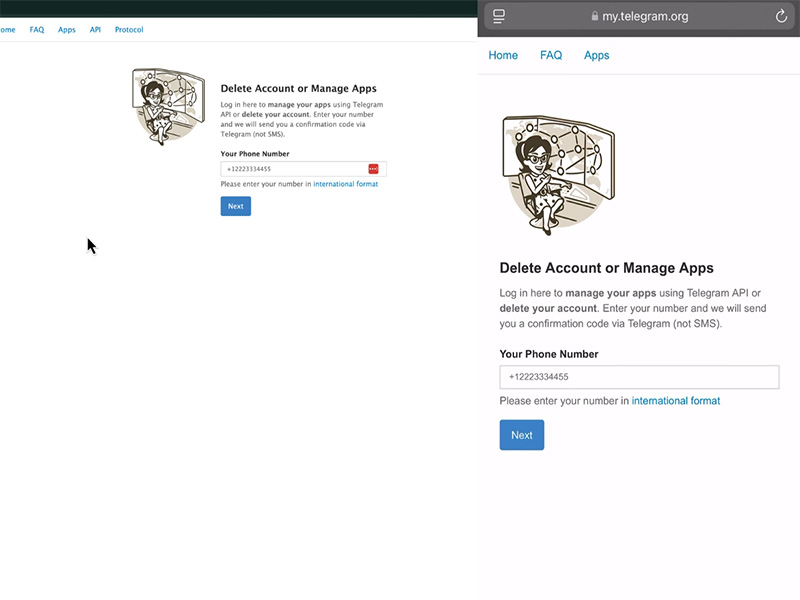
Step 2: Log In to Your Telegram X Account
On the telegram deactivation page, you’ll be prompted to enter your phone number associated with your Telegram X account. Make sure to enter it in international format without any spaces or special characters. Once you enter your number, click “Next.”
You’ll then receive a verification code via the Telegram X app. Open your telegram x android app, telegram x for pc app, or the telegram x apk version you have installed. You’ll see a pop-up with the verification code. Enter this code on the deactivation page to log in.
Step 3: Confirm Account Deletion
After logging in, you’ll be taken to a page where Telegram asks for the reason you’re deleting your account. Once you’ve entered a reason (or skipped it), click the “Delete My Account” button.
A final warning will appear, reminding you that deletion is permanent and all your data will be lost. Read this carefully, then click “Yes, Delete My Account” to confirm. That’s it, your Telegram X account is now deactivated, and the permanent deletion process will begin.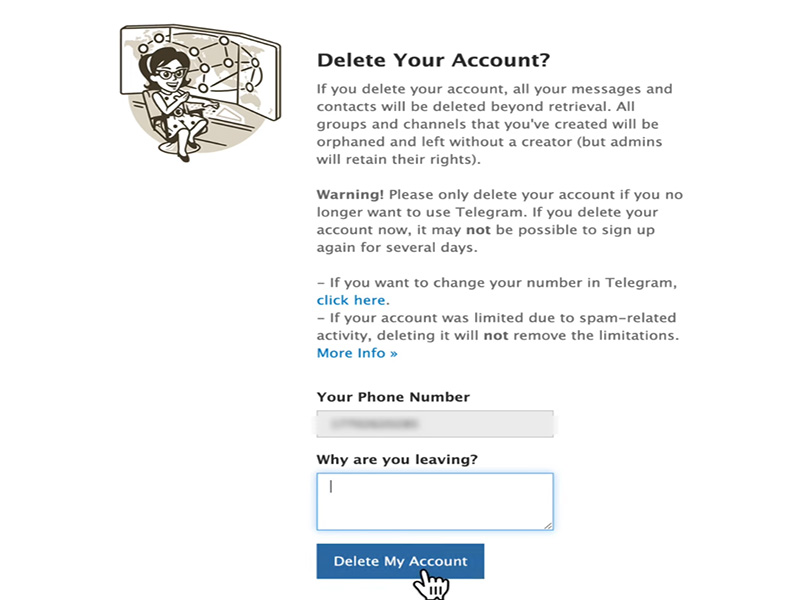
When Does Telegram Delete Account Permanently?
A common question many users have is when does telegram delete account after deactivation? Here’s the timeline you need to know:
- Immediate deactivation:As soon as you confirm deletion on the telegram deactivation page, your account is deactivated. This means you’ll be logged out of all devices, and your profile will no longer be visible to others.
- Permanent data deletion:Telegram typically takes 30 days to permanently delete all your data from its servers. During this 30-day window, if you change your mind, you can reactivate your account by logging back in via the Telegram X app with your phone number. After 30 days, your data will be erased permanently and cannot be recovered.
- Automatic deletion for inactivity:If you don’t delete your account manually, Telegram has an automatic deletion feature. By default, if your account is inactive for 6 months, it will be automatically deleted. But you can change this setting in the Telegram app to 1 month, 3 months, 6 months, or 1 year.
Deleting Telegram X Account on Specific Devices
While the core process uses the telegram deactivation page for all devices, here are some device-specific tips to make the process smoother:
For Telegram X Android Users
If you’re using telegram x android either from the Google Play Store or the telegram x apk, follow these extra tips:
- Ensure you have the latest version of Telegram X installed to receive the verification code promptly. If you’re using the telegram x apk, make sure it’s downloaded from a trusted source to avoid security risks.
- After deleting your account, uninstall the Telegram X app from your Android device to free up space.
For Telegram X for PC Users
If you use telegram x for pc, the process is just as simple:
- Open your preferred web browser and navigate to the telegram deactivation page.
- Log in with your phone number and verification code.
- After confirming deletion, log out of the Telegram X app on your PC and uninstall it if you no longer need it.
Final Thoughts
Deleting your Telegram X account permanently is a simple process, but it’s one that requires careful consideration since all your data will be lost forever. By following the steps outlined above, you can easily access the telegram deactivation page, confirm your deletion, and understand the timeline of when your account will be fully erased. Whether you use telegram x android, telegram x for pc, or the telegram x apk, the process is the same; just remember to back up your data first and double-check your decision before confirming.
If you ever change your mind within 30 days, you can reactivate your account by logging back in. But after that window closes, your Telegram X account will be gone for good. We hope this guide has helped you navigate the process with confidence!