Telegram has become one of the most popular instant messaging platforms for communities, creators, business owners, and project teams. In addition to private chats and group conversations, Telegram also offers a channel feature. Channels are designed for one-way communication, allowing administrators to share updates, news, files, videos, links, and other content with subscribers. For users who prefer a faster and more experimental interface, some also explore Telegram X latest APK to experience alternative performance features while staying connected with their favorite channels and communities.
If you want to build an audience, share content regularly, or manage a public community, creating a Telegram channel is a great option. This guide will explain how to create a channel, how to properly set up a channel, and how to make it useful for your audience.

What Is a Telegram Channel?
Telegram channels are a special communication tool designed specifically for sharing information with a large audience. Unlike regular chat or groups, channels primarily use a one-way communication method: administrators publish content, and subscribers receive updates. Many users who explore advanced messaging features also search for Telegram X download before joining or managing channels, as it offers a faster and smoother experience. This makes channels ideal for users who want to share content in an organized way and avoid receiving too much irrelevant information.
Channel owners can post many types of content, including:
- Text updates
- Photos and videos
- Voice messages
- Documents and files
- Website links
- Polls and announcements
One of the biggest advantages of Telegram channels is their ability to support a large number of subscribers, making them suitable for both small communities and large audiences.
Before You Create a Channel
Before opening Telegram, it helps to decide a few basic things:
1. Choose Your Topic
Ask yourself what your channel will focus on.
Examples:
- Mobile app tips
- Crypto news
- Movie reviews
- Travel stories
- Language learning
- Business updates
- Gaming content
A clear topic helps people understand why they should join.
2. Prepare a Name
Your channel name should be simple and easy to remember.
Good examples:
- Daily Tech Updates
- Smart Travel Guide
- Mobile Gaming Zone
- English Learning Daily
Try not to make it too long.
3. Prepare a Profile Image
A clean logo or simple image makes your channel look more serious and easier to recognize.
How to Create a Telegram Channel on Mobile
Most people create channels on their phones first.
Step 1: Open Telegram
Launch Telegram on your device.
Step 2: Tap the Create Button
On most devices:
- Android: Tap the pencil icon
- iPhone: Tap the compose icon
You will see several options.
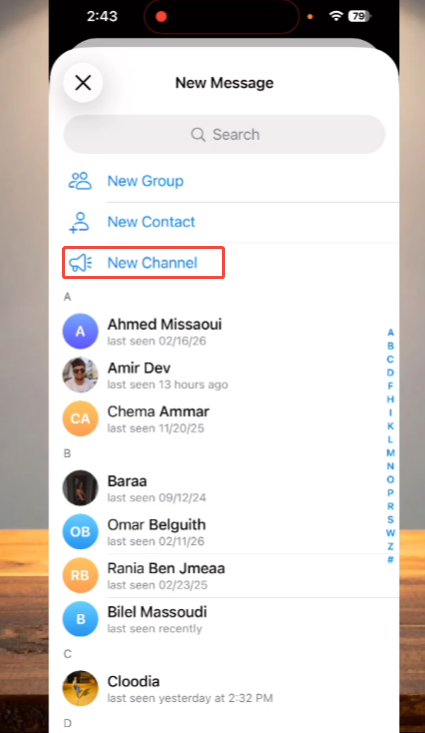
Step 3: Select “New Channel”
Tap New Channel.
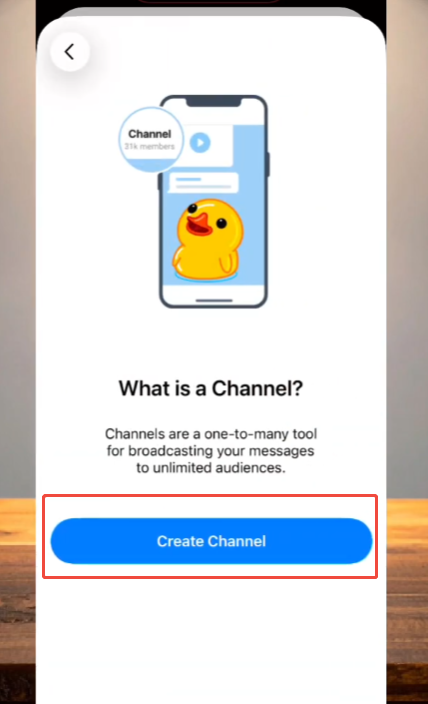
Telegram will open the setup page.
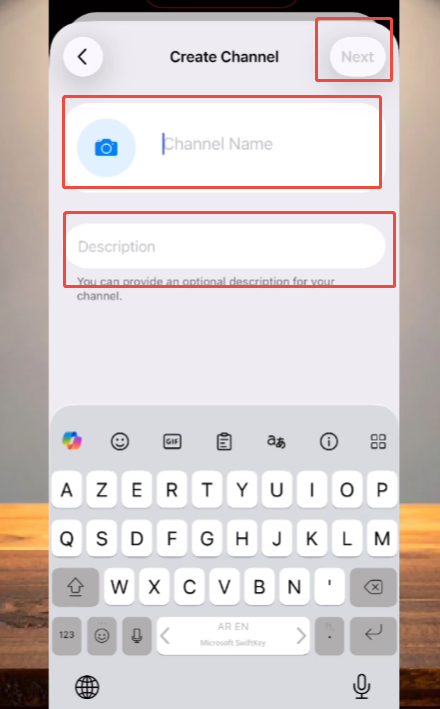
Step 4: Add Channel Information
Now fill in:
Channel Name
This is what people see first.
Description
Write a short intro.
This helps new visitors understand your content.
Step 5: Upload a Profile Photo
Add an image or logo.
This step is optional, but it helps your channel look complete.
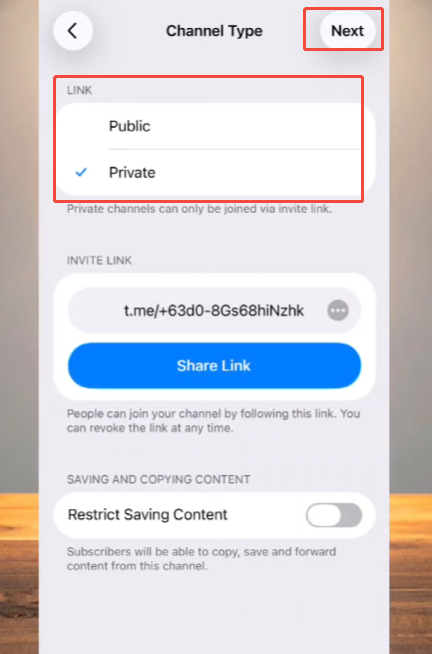
Step 6: Choose Channel Type
Telegram gives two options:
Public Channel
Anyone can search and join.
Best for:
- Content creators
- Bloggers
- Businesses
- Open communities
You also create a custom username link.
Private Channel
Only invited users can join.
Best for:
- Study groups
- Team updates
- Paid communities
- Internal communication
Choose the type based on your goal.
Step 7: Add Members
Telegram may ask if you want to invite contacts.
You can:
- Add people now
- Skip and invite later
After this, your channel is ready.
How to Create a Telegram Channel on Desktop
If you prefer working on a large screen or plan to manage images, files, videos, or longer text posts more easily, then creating a channel on your computer is a great option. Telegram Desktop offers almost the same channel tools as the mobile app, but many users find it more convenient for content management. Some users who explore different Telegram versions may also ask, Is Telegram X still available, especially when comparing interface speed, feature layout, or overall usability before deciding which platform fits their workflow best.
To get started, open Telegram Desktop on your computer. If you are not already logged in, please log in to your account.
Step 1: Open the Main Menu
After launching the Telegram desktop version, please check the top left corner of the screen and click the menu icon. A list of options will then appear.
Step 2: Select “New Channel”
Click “New Channel” in the menu. Telegram will open a new settings window where you can enter channel details.
Step 3: Add Channel Information
Now enter the basic information for your channel:
- Channel Name– Choose a clear and simple name that matches your content.
- Description– Write a short introduction so visitors know what your channel is about.
- Profile Image– Upload a logo, icon, or image that represents your channel.
These details help make your channel look more complete and professional from the beginning.
Step 4: Choose Public or Private
Next, Telegram will ask you to choose your channel type:
- Public Channel– Anyone can search for it and join through your custom link.
- Private Channel– Only people with an invite link can access it.
If you choose public, Telegram will ask you to create a unique username for your channel link.
Step 5: Add Contacts or Skip
Telegram may suggest that you add a contact as your first subscriber. You can invite others immediately, or you can skip this step and focus on creating content first.
Basic Settings You Should Change
After creating the channel, spend a few minutes adjusting settings.
Add More Admins
If you work with a team, add trusted admins.
They can help with:
- Posting content
- Managing subscribers
- Updating information
- Handling reports
Turn on Content Protection
Telegram allows content protection in some cases.
This can help reduce:
- Message forwarding
- Copying content
- Unwanted sharing
Useful for premium or original content.
Enable Discussion Groups
You can connect your channel to a discussion group.
This lets subscribers comment and interact while keeping the main channel clean.
How to Grow Your Telegram Channel
Creating a channel is just the first step. If you want to attract more people to join and keep them active, you need a clear growth plan. Developing a Telegram channel usually takes time, but steady progress is more effective than short-term promotion, especially when optimizing workflow with Telegram X faster than Telegram for smoother daily management and engagement.
Share Your Channel in the Right Places
One of the easiest ways to acquire your first subscribers is to share your channel link in places where your target audience frequents. You can share to platforms such as WhatsApp, Facebook, Instagram, X, forums, blogs, or online communities in your niche.
But remember not to post links everywhere without explanation. Instead, explain what people will gain from joining.
A simple reason can increase click-through rates and join rates.
Post Content on a Regular Schedule
If subscribers know when new content will be released, they are more likely to continue following. You don’t need to post content all day long; even posting just one or two high-quality pieces a day can yield good results.
A consistent release schedule helps build trust and keep the channel active.
Focus on Valuable Content
People will stay on channels that save them time, teach them knowledge, or provide entertainment.
Useful content typically grows faster than randomly posted posts. Tutorials, practical tips, the latest news, and exclusive content typically perform well.
Common Mistakes to Avoid
Many new channel owners make these mistakes:
Posting Too Much
Too many messages can annoy subscribers.
Posting Too Little
Long silent periods can make people leave.
Poor Channel Branding
No image, no description, and no clear topic can make your channel look unfinished.
Copying Other Channels
People usually join channels for fresh ideas and original content.
Final Thoughts
Creating a Telegram channel is easy, but building a truly useful channel requires careful planning and consistent effort. First, you need to define a clear theme to make the channel content look rich and complete, and publish content that users really want to pay attention to.
Whether you want to build a fan community, share knowledge, promote projects, or expand your corporate audience, Telegram channels offer you a flexible and convenient way to directly reach users. The earlier you start, the sooner you can build an audience.