You open a channel on Telegram and see the dreaded message: “This channel cannot be displayed” or “Potentially sensitive content.”
It’s a quick fix. This guide walks you through every method to find Telegram sensitive content settings — Telegram Web works for everyone, including iPhone, Android’s in-app toggle, and the Desktop app.
Why disable filtering Telegram not showing “Sensitive Content”
Telegram uses an automated system to scan public channels for things like nudity, violence, or pirated movies. If a channel is flagged for having restricted content, it will no longer show up in search results. Additionally, its preview images will be blurred with a “sensitive content” label, and any adult-rated stories will be hidden behind a warning message.
On iPhone, it’s stricter. Apple’s App Store Review Guidelines impose tighter rules than Google Play about adult content inside apps. To keep Telegram in the App Store, the iOS client intentionally hides the “Disable Filtering” toggle. That’s why so many iPhone users search “telegram 18 settings iphone” and “how to disable sensitive content on telegram iphone” and come up empty-handed — the button genuinely isn’t there in the app.
How to Turn Off Sensitive Content Filter on Telegram X
Telegram Web — The Universal Fix Works on iPhone, Android, and Desktop
This is the most reliable method and the only way for iPhone users to disable the filter. You don’t need a computer; you can do it from Safari or Chrome on your iPhone itself.
- Open a browser and go to web.telegram.org.
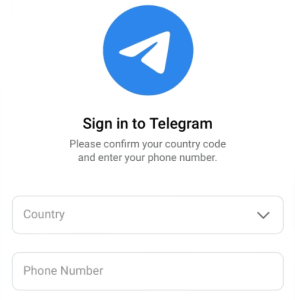
- Log in with your Telegram phone number and the verification code that gets sent to your Telegram app.
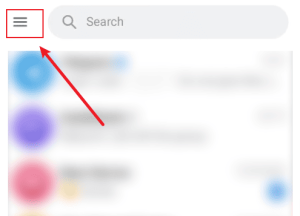
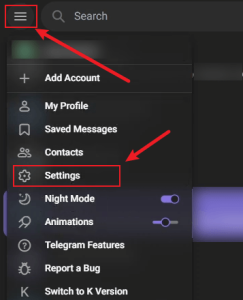
- Tap the ☰ hamburger menu in the top-left corner.
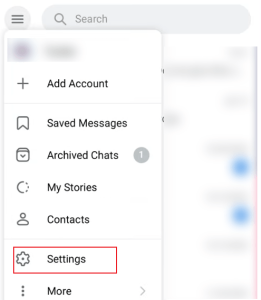
- Select Settings.
- Click on Privacy and Security.
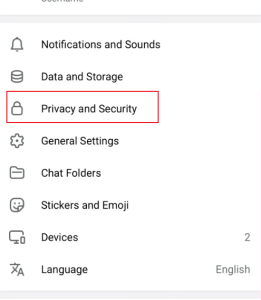
- Scroll down to the Sensitive Content section.
- Check the box next to “Disable filtering.”
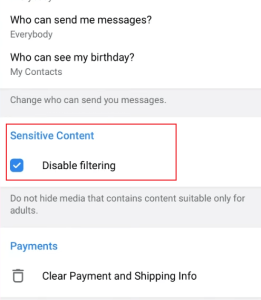
- Reopen Telegram on your iPhone. The settings sync automatically within a few minutes — no save button needed.
After checking the box, wait about 10 seconds before closing your browser to make sure your settings are saved. Next, completely close the Telegram app on your iPhone and open it again. Your hidden channels should now be visible.
How to Enable Sensitive Content on Telegram Android
If you’re on Android, the toggle is right there in the app.
- Open the Telegram app on your Android phone.
- Tap the ☰ menu in the top-left corner.
- Go to Settings.
- Tap Privacy and Security.
- Scroll down to the Sensitive Content section.
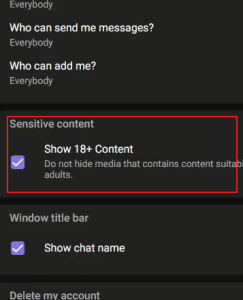
- Toggle ON “Disable filtering“. On some versions, the label reads “Show 18+ Content”.
- Head back to the channel or message that was blocked — it should now be visible. If you also run Telegram on an iPhone, that device picks up the change automatically.
Can’t find the option
There are two main reasons for this:
- Your app is outdated: Make sure to update Telegram through the Google Play Store.
- Regional restrictions: Telegram limits certain content based on your phone number’s country code. If your number is from a place like Indonesia or Malaysia, local laws might hide the setting entirely. Try using the web version instead. If that doesn’t work, the restriction is tied to your account and can only be fixed by using a phone number from a different region.
How to Enable Sensitive Content on Telegram iPhone
Telegram sensitive content IOS are not directly displayed; To change it, you must use a web browser on either your phone or a computer.
For those who live on their computers, the Desktop app surfaces the same toggle.
- Open Telegram Desktop.
- Click the ☰ menu or go to Telegram > Preferences (macOS).
- Navigate to Privacy and Security.
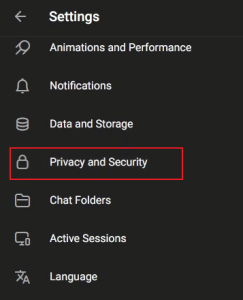
- Scroll to Sensitive Content and check “Disable filtering.”
- The change applies immediately on desktop and syncs to your connected mobile devices.
On macOS, you might also see a system-level alert the first time: “You may see sensitive media.” Tap Allow to commit the change.
What “Disable Filtering” Actually Unblocks
Flipping the switch:
- Public channels flagged by Telegram’s auto-classifier stop disappearing from search.
- Preview cards of those channels stop showing the blurred “Potentially sensitive” cover.
- Stories tagged 18+ stop collapsing behind a warning.
What it does not do:
- Private groups and 1-to-1 chats rely on user reports and local laws, not this toggle.
- Channels deleted by Telegram for terrorism, CSAM, or other illegal content are removed at the server level. They’ll return “This channel does not exist” — nothing you toggle will bring them back.
- Region-specific blocks are tied to your phone number’s country code and cannot be opted out of, even with filtering disabled.
- Accounts flagged as under 18 by Apple Family Sharing or Google Family Link will have the toggle greyed out. You must remove the supervised status first, then force-stop Telegram and retry.
I Disabled Telegram sensitive content settings, but Content Still Won’t Show
- Force-close and reopen the Telegram app. This is the #1 fix. On iPhone, swipe up from the multitasking view and flick the app away. On Android, use the recent-apps list or Settings > Apps > Telegram > Force Stop.
- Make sure you are using the same account on all your devices. Settings are specific to each account, so changing a setting on one account will not affect another.
- Wait a few minutes. Give it time, then restart the app again.
- Check if your account is region-locked. Use a browser to open web.telegram.org and look for the Sensitive Content section. If it’s missing entirely, your account is locked at the region level.
- Check for Family controls. On iPhone, go to Screen Time > Content & Privacy Restrictions. On Android, check Google Family Link. Either can grey out the toggle.
- Update the app. Older Telegram versions had a slightly different menu structure. Update via the App Store or Google Play.
- Try a different device to change the setting. If the web method didn’t stick, try the Android or Desktop method instead — sometimes one client writes the preference more reliably than another.
- Use a VPN. Telegram sometimes limits features based on your current location, not just your phone number. Changing your IP address to a different country might help, but keep in mind this won’t bypass restrictions tied directly to your phone number’s country code.
Final Thoughts: Telegram sensitive content settings
When the option is missing, Telegram Web and Telegram Desktop are worth trying, as they sometimes provide additional account settings that are unavailable on mobile devices. Android users generally have the most control and can often enable the Disable Filtering option directly through the app’s Privacy and Security settings.
It’s also important to remember that not every inaccessible channel is blocked by the sensitive content filter—regional regulations, deleted channels, private groups, or account-specific limitations may also prevent access.