Telegram is a powerful messaging app known for its speed and security features. However, its reliance on phone numbers for registration can create privacy concerns. Many users are unaware that their mobile number might be visible to others, potentially exposing them to unwanted contact, spam, or even harassment.
This guide will walk you through exactly how to hide your phone number on Telegram, with a special focus on Android devices, and explain the crucial settings that control who can find you by your number.
Many users think hiding their number automatically prevents people from finding them through it. These are actually two separate controls.
Even after hiding your phone number Telegram, people who know your phone number can still find your Telegram account through it. Hiding your phone number only prevents it from being displayed; to make it so that others cannot find you, you also need to set it so that contacts cannot find your account through your phone number.
How to Hide Mobile Number in Telegram Android
Step 1: Open Telegram
Launch the Telegram APP on your Android device.
Step 2: Open Settings
Click the settings in the bottom right corner.
Step 3: Go to Privacy and Security
This section contains all visibility and security controls.
Step 4: Open Phone Number Settings
After opening, you will see two important settings:
- Everybody
- My Contacts
- Nobody
Tap and select “Nobody.” This ensures your number is not displayed to anyone on your profile.
Step 5: Prevent others from finding you with your phone number
On the same screen, find the setting for “Who can find me by my number”. Change this from “Everybody” to “My Contacts.” This means only people who already have your number saved in their phone’s address book can locate your Telegram account by searching for it.
If you want some contacts to still be able to see the phone number, you can individually configure which contacts to exclude using the “EXCEPTIONS” option below.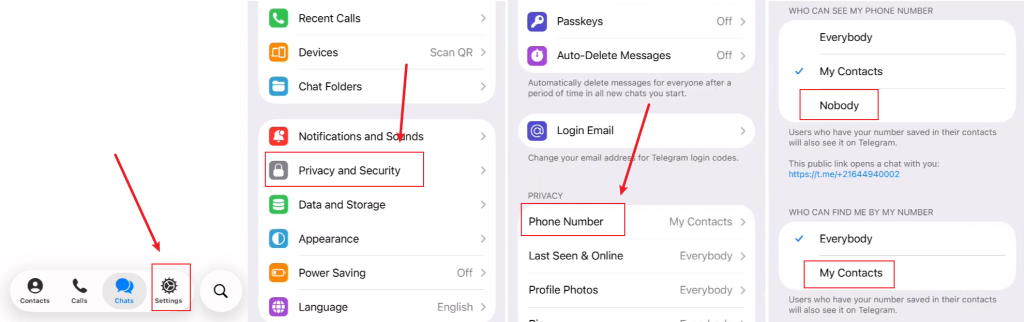
Steps for iPhone/iOS and Desktop
The principles are identical across platforms, with only slight variations in navigation.
- iPhone/iOS: Go to the “Settings” tab at the bottom > “Privacy and Security” > “Phone Number.” Set “Who Can See My Phone Number” to “Nobody” and “Find Me by Phone Number” to “My Contacts.” Then, go to Settings > Data and Storage to disable “Sync Contacts“.
- Desktop (Windows/macOS): Click the menu button (≡) > “Settings” > “Privacy and Security” > “Phone Number.” Set the dropdown to “Nobody” and uncheck “Allow finding me by phone number.” Note that the contact sync setting is typically managed from your mobile device.
Other enhanced privacy settings for the Telegram number
Even if you hide phone number Telegram, people who already have it saved in their contacts may still be able to find and add you on Telegram APK.
You can go back to the main “Settings” menu. Select “Data and Storage” and then “Sync Contacts.” Turn off “Auto-sync contacts” or a similar setting. This prevents Telegram from continuously uploading your contact list to its servers for matching. If this remains on, contacts who have your number might still see you as a suggested contact even with the other settings adjusted.
To further enhance the settings, you can stop future contact matching by deleting your contacts from Telegram’s servers. Privacy and Security > Contacts > Delete Synced Contacts and Sync Contacts.
You can block unknown people from contacting you, even if they are not in your contacts list. Privacy and Security > Phone Number > Nobody and My Contacts.
How to hide phone number in Telegram channel?
Telegram channels provide another layer of privacy. When you post in a channel:
- Subscribers cannot see your number.
- Only your channel identity is displayed.
Therefore, you don’t need to look for ways to hide phone number in the channel; you can simply hide it normally.
FAQ
Q: If I hide my number, how will people add me on Telegram?
A: You can share your Telegram username. People can search for this username directly to find and message you without ever needing your phone number.
Q: Why can I still see my phone number after hiding it on Telegram?
A: Even after you hide phone number, it will still appear on your profile page, visible only to you and not to other contacts.
Q: Do these settings sync across all my devices?
A: Yes. Telegram’s privacy settings are account-based and sync across all devices where you are logged in phone, tablet, desktop. A change made on your Android phone will automatically reflect on your iPad and Windows PC.
Q: Is there a way to hide my number from specific people but show it to others?
A: Yes. Telegram allows for exceptions. In the “Phone Number” settings, after choosing “Nobody,” you can tap “Add Exceptions” or “Always Allow” and select specific contacts from your list.
Q: I’ve hidden my number, but an old contact from years ago just messaged me. How?
A: This is likely due to the contact synchronization feature. If you had their number in your contacts and sync was enabled at any point, Telegram’s servers may have made the connection. Turning off “Sync Contacts” and using the “Who can find me” setting will prevent new connections but may not sever old ones already established by the server.
Final Thoughts
In my view, Telegram’s phone number privacy system is one of the platform’s greatest strengths. Unlike many messaging apps that force users to reveal their personal information, Telegram gives you meaningful control over who sees your identity and how others discover your account. Taking a few minutes to configure these settings is well worth the effort if privacy matters to you.