Telegram is one of the most popular messaging apps worldwide, known for its privacy features, fast performance, and cross-device compatibility. Whether you use telegram x android, or stick to the official app, managing your contact list is key to keeping your inbox organized and your privacy protected. Over time, you may accumulate unwanted contacts; old acquaintances, spam numbers, or synced contacts you no longer need and deleting them is a simple process.
In this guide, well walk you through how to delete contacts from Telegram on all devices, with a focus on telegram x android and telegram x apk users. Well also address common questions, including how deleting contacts differs from how to delete telegram account.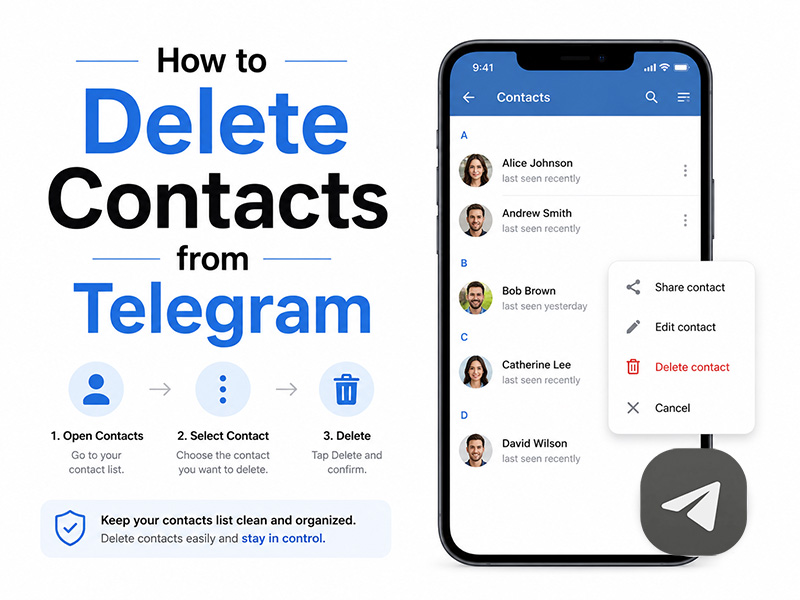
Why Delete Contacts from Telegram?
Before we dive into the steps, let’s cover why you might want to delete contacts from Telegram in the first place. Telegram automatically syncs contacts from your device when you sign up, which can lead to cluttered contact lists. Deleting unwanted contacts helps:
- Keep your contact list clean and easy to navigate, so you can quickly find the people you actually communicate with.
- Protect your privacy by removing contacts you no longer trust or interact with, preventing them from seeing your online status or profile details.
- Reduce clutter in your chat list and avoid accidental messages to the wrong person.
How to Delete Contacts from Telegram X
Telegram X is a popular modified version of Telegram, loved for its sleek design and extra features. Whether you’re using telegram x android or the telegram x apk, the process to delete contacts is identical to the official app and just as straightforward. Here’s a step-by-step breakdown:
Step 1: Open the Telegram X App
Launch the Telegram X app on your Android device. If you installed it via the telegram x apk, ensure it’s updated to the latest version to avoid any glitches. Once the app is open, you’ll land on your main chat screen.
Step 2: Access Your Contacts List
Tap the hamburger menu in the top-left corner of the screen or, on some versions of Telegram X, tap the “Contacts” tab at the bottom of the screen. This will take you to your complete list of Telegram contacts, including synced contacts from your device.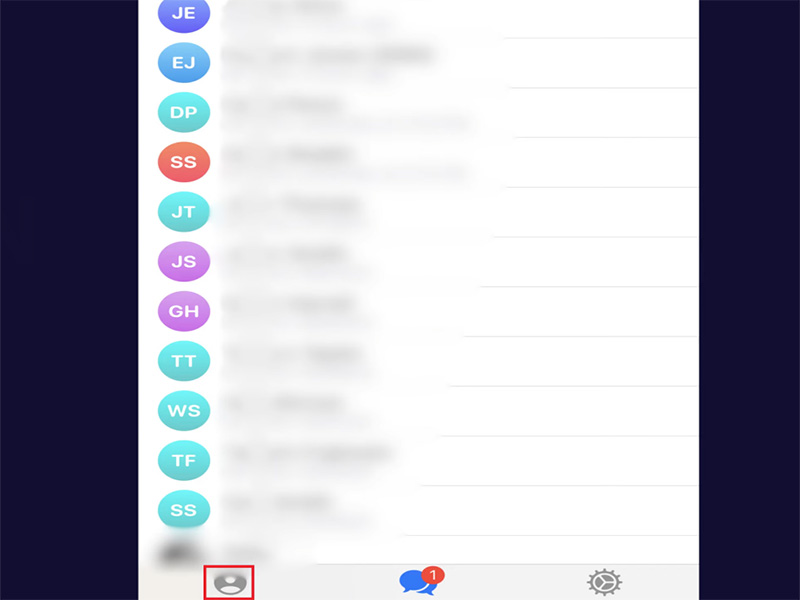
Step 3: Locate the Contact You Want to Delete
Scroll through your contacts list or use the search bar at the top to find the contact you want to remove. Type the contact’s name or phone number to quickly locate them. Once you’ve found the contact, tap on their name to open their profile page or chat window.
Step 4: Delete the Contact
If you’re on the contact’s profile page: Tap the three vertical dots in the top-right corner of the screen. A dropdown menu will appear, select “Delete Contact” from the options.
If you’re in the chat window: Tap the contact’s name at the top of the screen to open their profile, then follow the same steps above.
A pop-up will appear asking you to confirm the deletion. Tap “Delete” to finalize the process. The contact will be immediately removed from your Telegram X contact list.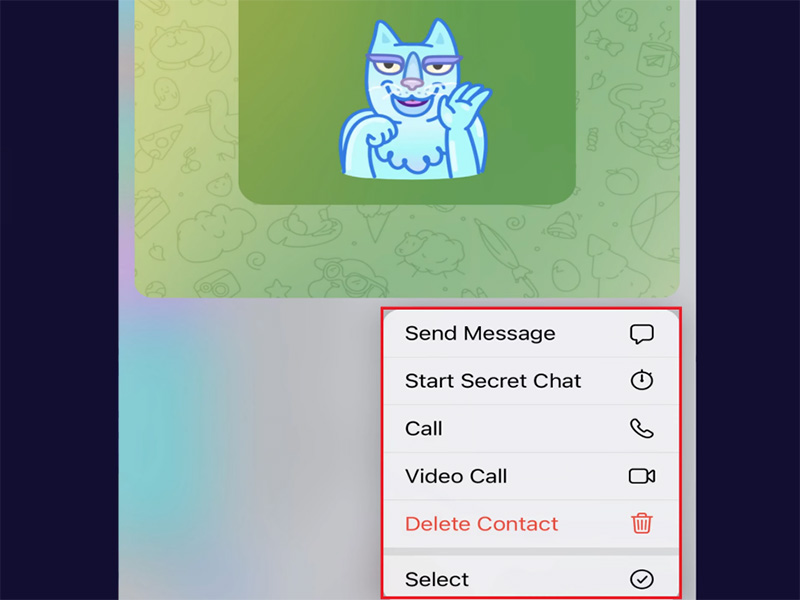
How to Delete Contacts from Telegram on Other Devices
While our focus is on telegram x android and telegram x apk, here’s a quick overview of how to delete contacts on other devices for completeness:
iOS (iPhone/iPad)
Open Telegram, go to the “Contacts” tab, find the contact you want to delete, tap their name, then tap the “Edit” button in the top-right corner. Scroll to the bottom of the page and tap “Delete Contact,” then confirm.
Desktop (Windows/Mac)
Launch the Telegram desktop app, click the hamburger menu in the top-left corner, select “Contacts,” find the contact, right-click on their name, and select “Delete Contact.” Confirm the deletion to remove them from your list.
Key Differences: Deleting Contacts vs. Deleting Your Telegram Account
Many users confuse deleting a contact with deleting their entire Telegram account. Let’s clarify the difference:
- Deleting a contact: Removes only that specific contact from your Telegram list. The contact can still message you, and your account remains active. This is a quick way to clean up your contact list without leaving the platform.
- Deleting your Telegram account: Permanently erases your entire account, including all chats, media, contacts, and profile information. This is a permanent action, and we’ll cover how to delete telegram account and thetelegram deactivation page below.
How to Delete Telegram Account
If you’ve decided to leave Telegram entirely, here’s how to delete telegram account using the official telegram deactivation pag:
- Open any web browser and go to the telegram deactivation page.
- Enter your phone number associated with your Telegram account in international format without spaces or special characters.
- You’ll receive a verification code via the Telegram X app. Open your telegram xapp, retrieve the code, and enter it on the deactivation page to log in.
- Once logged in, you’ll be asked to enter a reason for deleting your account. After that, click “Delete My Account.”
- Confirm the deletion by clicking “Yes, Delete My Account.” Your account will be deactivated immediately, and all your data will be permanently deleted within 30 days.
FAQs About Deleting Contacts from Telegram
- Will the contact I delete be notified?
No. Telegram does not send a notification to the contact when you delete them. They will only realize you’ve deleted them if they try to find you in their contacts or send you a message.
- Does deleting a contact delete our chat history?
No. Deleting a contact does not delete your chat history with them. Your past messages will still be visible in your chat list unless you manually delete the chat separately.
- Can I recover a deleted contact?
Yes, if you still have the contact’s phone number saved in your device’s address book, Telegram will re-sync the contact the next time you open the app. If you don’t have the number saved, you’ll need to re-add the contact manually by entering their phone number.
- Is there a way to delete multiple contacts at once?
Unfortunately, Telegram does not currently support bulk contact deletion. You’ll need to delete contacts one by one using the steps above.
- Do I need to delete contacts separately from Telegram X and the official app?
No. Telegram X and the official Telegram app share the same account system. If you delete a contact in Telegram X, it will also be deleted from the official app because your contacts are synced to your account.
Final Thoughts
Deleting contacts from Telegram is a quick and easy way to keep your contact list organized and protect your privacy. Remember, deleting a contact is not the same as deleting your entire account; if you ever need to leave Telegram for good, use the official telegram deactivation page to follow how to delete telegram account properly.
By following the steps in this guide, you can effortlessly remove unwanted contacts and maintain control over your Telegram experience. Whether you’re cleaning up synced contacts or removing old acquaintances, the process is straightforward. Now you have all the information you need to do it right.