Telegram is one of the world’s most popular instant messaging apps. People use it for private chats, group discussions, file sharing, business communication, and even creating community channels. But sometimes, you might want to put the app down temporarily. Perhaps you want to reduce screen time, improve focus, reduce notifications, or simply want to disconnect from the social media platform for a while. Some users also explore extra features through tools like Telegram Premium APK before deciding whether they still need the app in their daily routine or prefer taking a short break from constant online interaction.
If you want to know how to deactivate Telegram, this guide will provide detailed answers. You will learn what happens after you deactivate it, how to manually delete your account, how automatic deletion works, and what preparations you need to make before deleting your account.
What Does “Deactivate Telegram” Mean?
When people search for “deactivate Telegram,” they often mean different things. Unlike many social media apps, Telegram doesn’t offer a single “deactivate account” button. Therefore, the meaning of “deactivate” varies depending on the user’s needs.
For some, deactivating Telegram simply means temporarily stopping the messaging function. They might want to stop receiving notifications, avoid distractions, or reduce their online time. In this case, simply logging out or muting notifications is sufficient.
For others, deactivation means completely removing Telegram from their daily lives. They may want more privacy, plan to switch to another messaging platform, or simply feel they no longer need the account. Some users also spend time researching how to deactivate Telegram without losing chats before making a final decision, especially if keeping important conversations matters to them. In situations like these, permanently deleting the account may be the better long-term option.
Option 1: Log Out of Telegram Temporarily
If you only want a break, logging out may be enough.
On Android or iPhone
- Open Telegram
- Tap Settings
- Open your account menu
- Tap Log Out
After logging out:
- Your account still exists
- Your chats stay on Telegram’s servers
- You can log back in anytime with your phone number
This is useful if you are not ready to delete everything.
Option 2: Turn Off Notifications Instead
Some users think they need to deactivate Telegram, but the real issue is constant alerts.
To stop notifications:
- Open Telegram
- Go to Settings
- Tap Notifications and Sounds
- Turn off message alerts, group alerts, or call alerts
This lets you keep your account while removing daily distractions.
Option 3: Permanently Delete Your Telegram Account
If you want to fully deactivate Telegram, deleting your account is the real solution.
Telegram allows account deletion through its official account management page:
Telegram Account Deletion Page
Steps to Delete Your Telegram Account
Step 1: Open the deletion page
Use your browser and visit the Telegram account page.
Step 2: Enter your phone number
Use the same number connected to your Telegram account. Include your country code.
Example:
+1 for the United States
+44 for the United Kingdom
+65 for Singapore
Step 3: Get the confirmation code
Telegram will send a login code directly inside your Telegram app, not by SMS, in many cases.
Step 4: Sign in
Enter the code on the website.
Step 5: Delete your account
Choose the option to delete your account, then confirm.
Once finished, your Telegram account will be removed.
What Happens After You Delete Telegram?
Deleting a Telegram account is not the same as uninstalling the Telegram app from your phone. Once you complete the account deletion process through Telegram, your account and most of its associated data will be permanently deleted from the Telegram system. Even if you have previously explored alternative clients such as Telegram X latest version for a different messaging experience, deleting your account affects your access across all Telegram-based apps. Since this operation is permanent in most cases, it is important to understand what changes occur after deletion.
Your chats and messages
Deleting your account will delete your personal cloud chat history and account data. Messages associated with your account in private conversations may disappear from your device. In some cases, messages sent to other users may still be retained in their chat history.
If you have important conversations, notes, or documents stored in Telegram, please download them before deleting your account.
Your groups and channels
If you created groups or channels, they may still exist even if your account is deleted. However, if you lose account access, your profile will no longer show you as the owner or administrator.
To avoid management issues, it is recommended that you transfer administrator privileges before deleting your account, especially if other members still frequently use the group.
Your contacts and profile
Once the account is deleted:
- Your profile photo has been removed
- Your username becomes inactive
- Your contacts can no longer send you messages through Telegram
- People searching for your account may not find your profile anymore
This means your Telegram identity is no longer active on the platform.
Saved files and media
Many users use Telegram to store photos, videos, voice notes, or work documents. These cloud files are usually inaccessible after the account is deleted.
If you have stored media files in your chat history or saved messages, please back them up before deleting your account.
Can you come back later?
Yes, you can create a new Telegram account using the same phone number. However, your previous chat history, contacts, settings, and account history are usually not automatically restored.
Use Telegram’s Auto-Delete Option
Telegram also offers automatic account removal if you stay inactive.
You can set this inside the app.
Steps
- Open Telegram
- Go to Settings
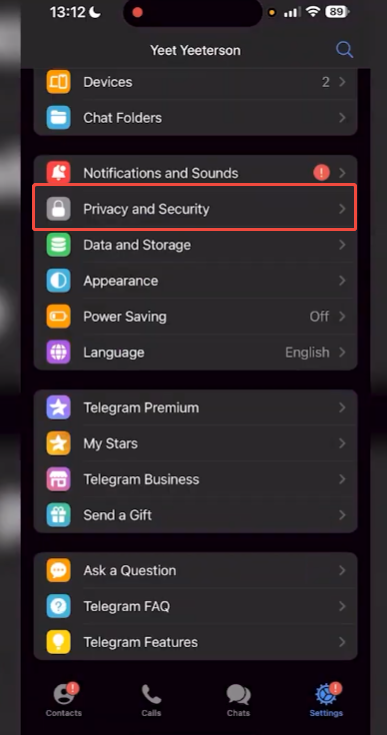
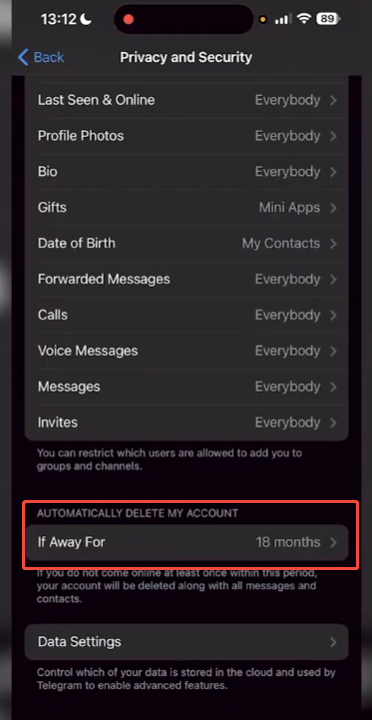
- Open Privacy and Security
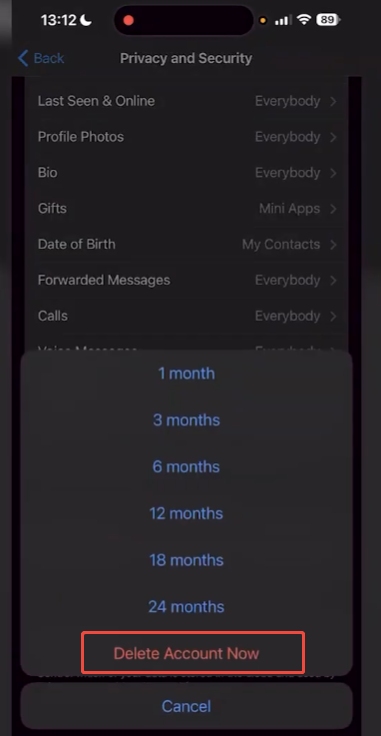
- Find Delete My Account If Away For
You may see options like:
- 1 month
- 3 months
- 6 months
- 12 months
- 18 months
- 24 months
If you do not log in during that time, Telegram deletes the account automatically.
This is useful if you want to leave without deleting it right now.
Things to Do Before Deleting Telegram
Before permanently deleting your Telegram account, we recommend taking a few minutes to review your data and account settings. If you have ever explored alternative versions such as Telegram mod apk for additional features or customization, it may also be helpful to check whether any local files or app-specific settings need to be backed up. Once your account is deleted, you may not be able to recover previous chat history, files, or account details. Taking a few simple steps now can help you avoid losing important information in the future.
Back Up Important Chats and Files
Many people use Telegram for more than just instant messaging. It’s often used to store photos, videos, work documents, voice messages, saved links, and personal notes. Before deleting an account, open your chat history and check for any content you might need later.
Pay special attention to:
- Personal photos or videos shared by friends or family
- Work documents or project files
- Voice messages with useful information
- Saved messages that contain notes, links, or reminders
- Media from private groups or channels
Download and save these files to your phone, computer, or cloud storage before continuing.
Inform Your Important Contacts
If you frequently communicate with friends, colleagues, classmates, or clients on Telegram, please inform them of your plans to leave the platform. This will prevent misunderstandings if someone tries to contact you after you deregister your account.
You can send a short message using your preferred contact method, for example:
- Another messaging app
- Phone number
- Social media account
This is especially helpful if Telegram is your main communication tool.
Check Groups, Channels, and Admin Roles
If you created or manage groups, channels, or communities on Telegram, review them before deleting your account.
Make sure to:
- Transfer ownership to another trusted admin
- Update group members if needed
- Save important announcements or pinned messages
- Remove personal information from public channel descriptions
This helps the community continue running smoothly after you leave.
Review Linked Devices and Security Settings
Telegram typically keeps you logged in on multiple devices, such as your phone, tablet, laptop, or desktop computer. Before deleting your account, please check which devices your account is active on.
Go to your active sessions and review:
- Mobile devices
- Desktop apps
- Browser sessions
Logging out of unused devices adds an extra layer of privacy before your account is removed.
Save Contact Information
Some people only keep specific contacts on Telegram. Before deleting an account, check if it contains usernames, phone numbers, or business contacts that you might need later.
Saving this information now can prevent problems when trying to reconnect in the future.
Can You Create a New Telegram Account Later?
Yes. After deleting your account, if the number is still valid, you can re-register on Telegram using the same number.
Your previous chat history, groups, and settings are usually not restored.
Final Thoughts
If you want to stop using Telegram, you have a few options. If you want to take a break, you can try logging out of your account. If you find the app distracting, turning off notifications might help. If you want to quit permanently, deleting your account through the official Telegram account page is the best option.
Before making a final decision, be sure to back up important data and carefully consider whether you want a temporary break or a permanent quit. Choosing the right method can save you time and prevent you from losing messages or files you still need.