Telegram is a hub for communities, news, hobbies, and niche interests; all organized into channels, where admins share content with subscribers. Whether you’re looking for a channel about tech, fitness, crypto, or local updates, knowing how to search effectively is key. This 2026 guide will walk you through the entire process, including how to search channels on telegram on phone, and answer the common question: how to search private telegram channels. We’ll also cover tips to find high-quality channels and avoid spam, making your Telegram search experience smooth and productive.
First: Understand Telegram Channels
Before diving into search methods, it’s important to distinguish between public and private Telegram channels—this will determine how you can find them:
- Public Channels:These have a unique username and are searchable within Telegram. Anyone can find, view, and subscribe to them. Most channels you’ll search for fall into this category.
- Private Channels:These are not searchable via Telegram’s built-in search. They require an invite link or approval from the admin to join. This is why many users wonderhow to search private telegram channels because they’re intentionally hidden from public search.
Whether you’re using the official Telegram app, telegram x android, or the telegram x apk, this distinction applies.
How to Search Channels on Telegram on Phone
The most common way to search for Telegram channels is on your phone, and how to search channels on telegram on phone is straightforward. Here’s a step-by-step guide that works for both the official app and Telegram X:
Step 1: Open Telegram X
Launch the Telegram X app on your Android device. If you’re using the telegram x apk, ensure it’s updated to the latest version to access all search features. The telegram x apk functions identically to the Play Store version, and you’ll just need to enable “Install unknown apps” in your device settings to install it initially.
Step 2: Access the Search Bar
On the telegram x android app, you’ll find the search bar at the top of the main chat screen. Tap the search icon or the search bar itself to activate it. This is the same for both the main Telegram app and Telegram X, no extra steps needed for the alternative client.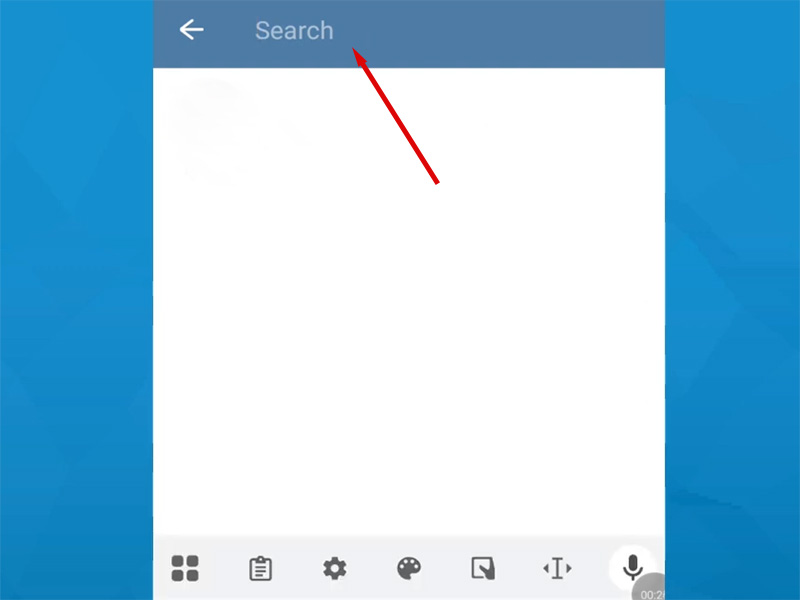
Step 3: Search for Channels Using Keywords or Usernames
Type in your search query; this can be a keyword or a specific channel username. Here’s how to refine your search for better results:
- Use specific keywords:Instead of “cooking,” try “vegan cooking recipes” or “quick weeknight meals” to narrow down results.
- Include the channel type:Add “channel” to your query to filter out groups and individual chats.
- Search by username:If you know the exact username, type it directly into the search bar. This will take you straight to the channel, no scrolling needed.

Step 4: Filter Results to Find Channels
After entering your query, Telegram X will show a mix of results: channels, groups, contacts, and bots. To focus only on channels:
- Look for the “Channels” tab at the top of the search results, and tap it to see only channels.
- If there’s no “Channels” tab, look for results labeled “Channel” below the name.
Step 5: Join in the Channel
Tap on the channel you want to join to open its profile. On telegram x android, tap the “Join” button at the bottom of the screen to start receiving updates from the channel. You can also preview the channel’s recent posts before subscribing to ensure it’s what you’re looking for.
How to Search Private Telegram Channels
As mentioned earlier, private Telegram channels aren’t searchable via Telegram’s built-in search—which is why how to search private telegram channels is such a common question. Unlike public channels, private ones require an invite or direct access. Here are the most effective ways to find and join them in 2026:
Method 1: Use Invite Links
The only direct way to access a private Telegram channel is with an invite link. You can get these links from:
- Friends or acquaintances who are already members of the private channel.
- Niche forums, Reddit communities, or Discord servers related to your interest.
- Social media posts: many private channels share their invite links on Instagram, Twitter, or Facebook to grow their audience.
To join via an invite link on telegram x: Tap the link, which will open directly in the Telegram X app, then tap “Join Channel” to gain access.
Method 2: Use Telegram Search Bots
There are several Telegram bots designed to help users find private channels by niche. Here’s how to use them on telegram x android or telegram x apk:
- Search for the bot in Telegram X.
- Tap “Start” to activate the bot.
- Enter a keyword related to the private channel you’re looking for.
- The bot will share invite links or contact information for relevant private channels .
Method 3: Use Third-Party Channel Directories
Several third-party websites curate private Telegram channels by category. These directories, like TLGRM.eu or Telega.io, list invite links for private channels in niches like finance, education, and hobbies. To use them:
- Open your phone’s web browser and visit a trusted directory.
- Browse by category or search for your niche.
- Copy the invite link for the channel you want.
- Open the telegram x, paste the link into the search bar, and tap “Join Channel.”
Note: Always verify the legitimacy of third-party directories. Some may share fake or spammy links. Stick to well-known platforms for safety.
Telegram X APK & Telegram X Android: Extra Search Tips
Whether you’re using telegram x android or the telegram x apk, these tips will make your channel search more efficient:
- Enable “Search Public Posts”:Telegram X has a feature that lets you search for posts across public channels. Go to Settings > Privacy and Security > Search Public Posts to enable this.
- Use hashtags:Many channels use hashtags in their posts. Type a hashtag into the search bar on telegram x apk to see posts from relevant channels, then tap through to the channel itself.
- Clear search cache:If your search results are outdated, go to Settings > Storage > Clear Search Cache to refresh results.
Remember: Avoid downloading the telegram x apk from unknown websites to protect your device from malware.
FAQs About Searching Telegram Channels
- Why can’t I find a channel I’m looking for?
If a channel doesn’t appear in search results, it’s likely a private channel or you’re using too vague keywords. Try more specific terms or check if the channel has a public username.
- Is there a way to search for channels by location?
Yes! Add your city or region to your search query to find local channels.
- Can I search for private channels without an invite link?
No, private channels are designed to be hidden from public search. The only way to access them is with an invite link or admin approval.
- Does Telegram X have better search features than the official app?
Telegram X has the same core search features as the official app but with faster performance and a more intuitive interface. The search process is identical for both, so you won’t miss any channels using telegram x apk.
- How do I avoid spam channels when searching?
Look for channels with a high number of subscribers and recent posts. Avoid channels with vague names or posts that look like clickbait. On telegram x android, you can preview posts before subscribing to check for spam.
Final Thoughts
Searching for Telegram is easy once you know the right methods. For how to search channels on telegram on phone, telegram x apk offer a seamless experience, with the same search functionality as the official app. When it comes to how to search private telegram channels, focus on invite links, trusted bots, and reputable directories to stay safe and find relevant communities.